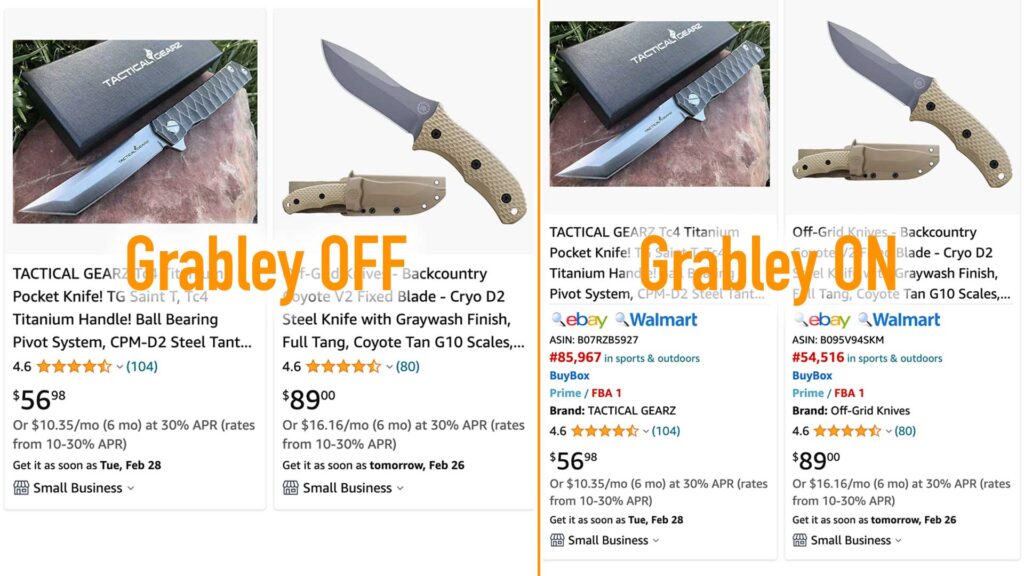
Google Chrome extension for research products on Amazon, Ebay, Walmart
Grabley - Product Search Tools
Amazon options
Hide - "Prime" items
“Prime” products are 90% FBA products, or FBM sellers with the Prime status, if you are not a Prime seller, then it is more convenient for you to compete with the same sellers, for this you can hide all “Prime” products.
Hide - Sold by Amazon
Each product can have several sellers, and Amazon often acts as a seller among them, to hide such products – enable this option.
Hide - Items with variation
It is often not very convenient for sellers to work with products that have many variations, you can easily hide them from the search list by enabling this option.
Only - Currently unavailable
The product that all sellers have now run out of has the status “Currently unavailable” and this is a great opportunity to get quick sales. In order for Amazon to start showing such products, turn on the filter on Amazon – “Include Out of Stock”, then using this extension option you will see only Currently unavailable. Attention! Be sure that you have a sales permit and the product is exactly the same.
Hide - Advertising blocks
Inserts of Advertising blocks often interfere, and they also take longer to load the page. Turn on this option and see how much more convenient and faster it is to search for products.
Button - Search on Walmart
Add a quick search button on Walmart, in one click you will go to the Walmart marketplace with keywords to search for a similar product.
Button - Search on eBay
Add a quick search button on eBay, in one click you will go to the eBay marketplace with keywords to search for a similar product. If you also marked the options: “Buy now” and (or) “Location: North America”, these options will be automatically marked on eBay after the transition.
Show - ASIN
ASIN is a unique product identifier on Amazon. This option will allow you to see the ASIN of products on the search page, so as not to go to each product.
Show - BuyBox
BuyBox is a button that allows you to buy goods on Amazon in one click, if it is not active, then you can buy goods only from the list of sellers, competition on such goods is easier.
Show - BSR (Best Sellers Rank)
BSR – Best Sellers Rank is an indicator of how well a product sells compared to other products in the same category. The smaller the BSR, the more sales.
Hide - Empty BSR
Products without BSR are products that most likely have not been sold yet, to hide them from the search page, enable this option.
Hide - If BSR less than the value
You can hide products that are not selling very well, set the BSR value – above which the goods will be hidden.
Show - Brand
There are products with and without a brand on Amazon. It is also useful to see the brand name in the search results.
We use cookies to ensure that we give you the best experience on our website. If you continue to use this site we will assume that you are happy with it.